
Many B2B buyers now ask an AI assistant for a shortlist before they open a vendor website, and that creates a reporting gap. Your rank tracker shows blue links, your web analytics shows sessions, but neither tells you whether ChatGPT, Perplexity, Gemini, Copilot or Google’s AI features actually mention your brand when a buyer asks for a shortlist. Closing that gap means treating AI search visibility as its own measurable channel.
This guide is not about how to get cited. If you need the fundamentals of optimizing for generative engines, start with our introduction to generative engine optimization. Here we focus on the next question every CMO eventually asks: how do we measure it, how reliable are the numbers, and how do we connect them to pipeline?
Why AI search visibility needs its own scorecard
The audience is already enormous. At Google I/O in May 2026, Sundar Pichai said AI Overviews had passed 2.5 billion monthly active users and AI Mode had passed 1 billion in roughly a year. Add standalone assistants, and a large slice of early-stage research now happens inside generated answers.
Those answers also change click behavior. A Pew Research Center analysis of browsing data from 900 U.S. adults found that people who saw a Google AI summary clicked a traditional result in 8% of visits, against 15% when no summary appeared. Only 1% of visits included a click on a link inside the summary, and sessions ended outright on 26% of pages with a summary versus 16% without one.
Enjoying this article? Get B2B marketing intelligence every weekday morning.
Subscribe Free — Takes 10 Seconds →The implication is simple: influence and clicks have come apart. A buyer can absorb your positioning, or a competitor’s, without visiting your site, so traffic alone undercounts the channel.
The AI visibility measurement loop
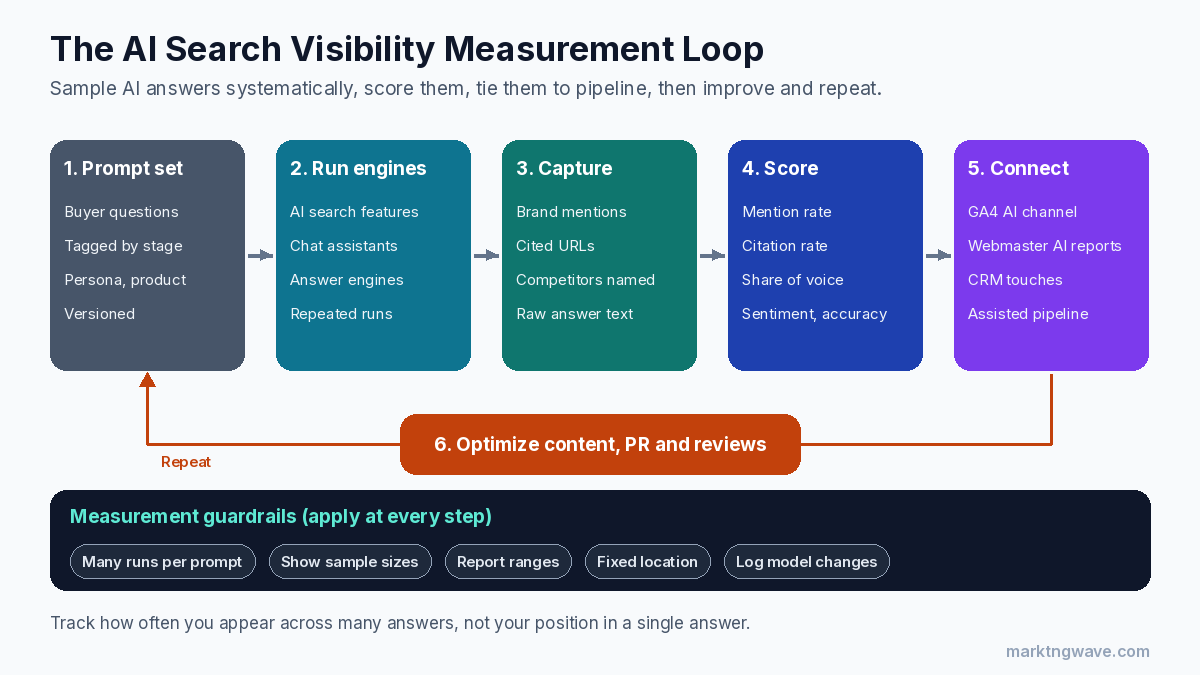
Reliable measurement is a repeatable loop, not a one-off audit: define what buyers ask, sample the engines, capture mentions and citations, score the results, connect them to first-party data, and feed the lessons back into content and PR.
Step 1: Build a prompt set from real buyer journeys
Your prompt set is the equivalent of a keyword list, and it deserves the same care. Pull language from sales call notes, win/loss interviews, support tickets, community threads and the search queries already reaching your site. Then organize prompts by journey stage.
Map prompts to buying stages
- Problem awareness: “Why do mid-market SaaS companies struggle with lead routing?”
- Solution exploration: “What types of tools automate lead routing for B2B sales teams?”
- Shortlisting: “Best lead routing software for a 200-person company using Salesforce.”
- Comparison and validation: “How does [your brand] compare with [competitor] for enterprise security?”
- Brand and reputation: “What do customers say about [your brand]’s onboarding?”
Keep the set stable and versioned
Start with a focused set that covers each priority segment and stage, small enough that you can run every prompt several times. Tag prompts by stage, persona, product line and region, freeze the set for at least a quarter, and version every change. Rewriting prompts monthly makes trend lines meaningless.
Step 2: Run the set across the engines that matter
Cover the surfaces your buyers actually use: Google AI Overviews and AI Mode, ChatGPT with search, Perplexity, Gemini and Microsoft Copilot. Each behaves differently. Record the engine, mode, model version where visible, location, date and whether you were logged in, because all of these shift results.
For every response, capture three things: whether your brand is mentioned, whether one of your URLs is cited as a source, and which competitors appear alongside you. Store the raw answer text for sentiment review and error checks.
The metrics that matter, and how to measure them
| Metric | What it tells you | How to measure |
|---|---|---|
| Mention rate | How often the AI names your brand for prompts in your category | Responses mentioning your brand divided by total responses, per engine and stage |
| Citation rate | How often your own pages are used as sources | Responses citing one of your URLs divided by total responses; check cited pages in Bing and Search Console reports |
| Share of voice | Your visibility relative to named competitors | Your mentions divided by all brand mentions across the tracked competitor set |
| Sentiment and accuracy | Whether answers describe you positively and correctly | Score each mention as positive, neutral or negative, and flag factual errors for review |
| Position or prominence | Whether you are a lead recommendation or a footnote | Record placement in the answer, but report it as an average band, not an exact rank |
| AI referral traffic | Clicks that do arrive from assistants | A custom “AI assistants” channel group in GA4 built on known source domains |
| Assisted pipeline | Business impact on opportunities and revenue | CRM opportunities with AI-referred touches or self-reported AI discovery |
Mention rate and share of voice are your headline metrics. Citation rate shows whether your own content or third-party sites are shaping the answer. Sentiment and accuracy are risk metrics: one confidently wrong statement about pricing or compliance can quietly cost deals.
Use the first-party data you already have
Before buying a platform, use the free reports the engines now provide.
Google Search Console
Google’s generative AI performance report in Search Console shows how often links to your site appeared in AI Overviews and AI Mode, broken down by page, country, device and date. Google says it rolled the report out to all websites worldwide as of August 31, 2026. It reports impressions, so pair it with clicks from the standard Performance report and conversion data in GA4.
Bing Webmaster Tools
Microsoft’s AI Performance report covers Copilot, AI summaries in Bing and select partner experiences, with total citations, cited pages and grounding queries. In June 2026 Microsoft added Intents, Topics, Citation Share and Compare in preview. Citation Share is the percentage of all citations for a grounding query that point to your site. Microsoft is explicit about its limits: “Citation Share is designed as an observational metric – not a ranking system or a competitive scoreboard.” It does not reveal competitor domains, so you still need your own sampling for share of voice.
GA4 referral tracking
Create a custom channel group in GA4 with an “AI assistants” channel that matches sources such as chatgpt.com, perplexity.ai, gemini.google.com, copilot.microsoft.com and claude.ai. Place it above the default Referral channel so these sessions are not absorbed into generic referrals. Remember that this is a floor, not a total: many AI-influenced visits arrive as direct or branded search.
Tooling categories to consider
This market changes monthly, so evaluate categories before vendors:
- Prompt-tracking platforms run your prompt set on a schedule across several engines and report mention rate, share of voice and citations.
- SEO suite add-ons extend existing rank tracking with AI Overview and AI Mode visibility, which is convenient if you already pay for the suite.
- Brand and media monitoring tools are adding AI answer monitoring alongside social and news listening, useful for sentiment and reputation.
- In-house scripts using engine APIs plus a spreadsheet or warehouse work for smaller prompt sets, though API answers can differ from what users see in the apps.
Ask every vendor how many times it runs each prompt, which interfaces it queries, how it handles location, and whether it publishes its methodology.
Sampling and variance: the pitfall that breaks most reports
Generated answers are probabilistic. In research published in January 2026, SparkToro and Gumshoe had 600 volunteers run 12 recommendation prompts through ChatGPT, Claude and Google’s AI a combined 2,961 times. The chance of getting the same list of brands twice was below 1 in 100, and the same list in the same order was closer to 1 in 1,000. The authors suggested that prompts may need 60 to 100 runs to understand an AI’s typical recommendations, and found that how often a brand appears across many runs holds up far better than its position in any single answer.
Practical rules follow from this:
- Never report a single run. Repeat each prompt several times per engine and report the share of runs that mention you.
- Report ranges, not points. Show confidence bands or at least the sample size next to every percentage.
- Aggregate up. Topic-level and stage-level averages across many prompts are far more stable than prompt-level numbers.
- Treat “AI rank” with suspicion. Prominence bands (top, middle, passing mention) are more honest than exact positions.
- Control the conditions. Keep location, language and account state consistent, and annotate model updates on your charts.
Connect visibility to pipeline
Visibility metrics earn budget only when they line up with revenue. Three practical links work for most B2B teams:
- Self-reported attribution. Add “AI assistant (ChatGPT, Gemini, Perplexity, etc.)” as an option to the “How did you hear about us?” field on demo and contact forms, and sync it to the CRM.
- Referral touches in the CRM. Pass the GA4 AI-assistant channel into your marketing automation platform and CRM so opportunities show AI-referred touches alongside other sources.
- Trend correlation by topic. Compare quarterly changes in share of voice for a product line with branded search volume, direct traffic and pipeline for that product line.
Treat these as directional evidence, not proof of causation. For the bigger question of how AI discovery fits alongside your other channels, multi-touch attribution, media mix modeling and incrementality tests all have a role; our guide to B2B marketing attribution with MTA, MMM and incrementality explains how to combine them.
A reporting cadence that works
- Weekly: automated runs, plus alerts for major drops in mention rate or new factual errors about your brand.
- Monthly: a scorecard of mention rate, citation rate and share of voice by engine and stage, with AI referral sessions and key events from GA4, Search Console and Bing.
- Quarterly: a business review linking visibility trends to self-reported AI discovery and assisted pipeline, and a decision on which content, PR or review-site gaps to fix next.
AI search visibility measurement checklist
- A versioned prompt set tagged by stage, persona and product.
- Coverage of AI Overviews, AI Mode, ChatGPT, Perplexity, Gemini and Copilot.
- Multiple runs per prompt, with sample sizes shown in every report.
- Mention rate, citation rate, share of voice, sentiment and accuracy tracked over time.
- Search Console generative AI report and Bing AI Performance report reviewed monthly.
- An “AI assistants” channel group live in GA4.
- An AI option in the “How did you hear about us?” form field, synced to the CRM.
- A quarterly review that ties visibility to pipeline and assigns fixes.
FAQ
What is AI search visibility?
It is how often and how favorably AI assistants and AI search features mention or cite your brand when people ask questions related to your category, compared with competitors.
How many prompts should a B2B company track?
Start with enough prompts to cover each priority product and buying stage, then expand. Running each prompt several times matters more than adding hundreds of prompts you can only sample once.
Can GA4 show traffic from ChatGPT and other assistants?
Yes, partially. Sessions referred by assistant domains appear as referrals and can be grouped into a custom channel. Visits where the referrer is stripped show up as direct, so treat the figure as a minimum.
Is share of voice in AI answers the same as SEO share of voice?
No. SEO share of voice is usually based on rankings and estimated clicks. AI share of voice is based on how often your brand is named in generated answers relative to competitors, measured across repeated samples.
Stay ahead of B2B MarTech
Want practical guides on AI search, measurement and AI-powered marketing every week? Subscribe to Marktngwave and get new analysis delivered straight to your inbox.
